Showing posts with label iPad. Show all posts

Monday, November 3, 2014

Upgrading to iOS 8 - A How To Lesson

After thoroughly testing Apple's new iOS, the technology department is ready to go ahead with a school wide upgrade process. We want all San Domenico iPad users to implement this update by Wednesday, November 11, 2014.

Please note: We would like users to implement this upgrade on their home network to prevent overloading our school network and so that you will have your device ready to go at school the next day. Also, there is one very significant issue related to your Notability App that we will address at the end of these instructions.

Please follow these instructions:

1.  This upgrade requires a large amount of space on your device. Make sure you have at least 5 GB of available storage on your iPad (preferably more). Here is a Business Insider article that explains why you need all this storage space on your iPad in order to perform this update. In the article you will also find a brief explanation of How to Free Up Space on your device in preparation for this process.
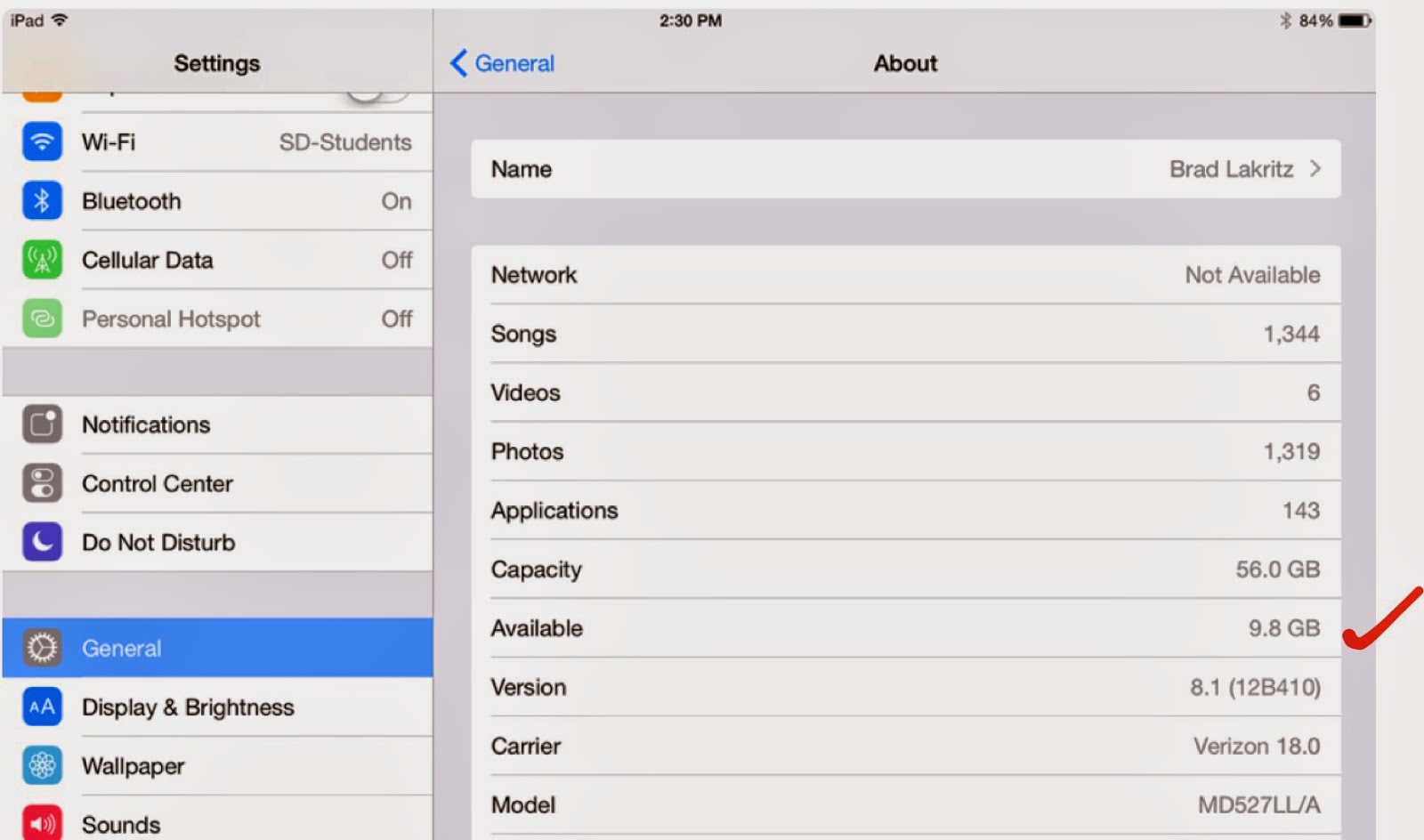
To check your available space open your Settings App. Tap General > About. Halfway down the screen is the Available storage. The amount available is listed on the right. If you do not have 5 GB of available storage you will need to clear space.
2.  Make sure your iPad documents and data are backed up. Check the digital tools presentation for instructions on how to set up iCloud, Google Drive, and Box back ups for your data.

3.  Make sure your iPad is fully charged and plugged in before you begin the update. For good measure we recommend you close all open Apps.

4.  To begin the upgrade open your Settings App. Tap General > Software Update > Download and Install

Note: This is a very large file download. Be patient in this process as it may take a long time before you see progress on your screen. Also, your iPad may have already downloaded the installer in which case you will see a button that only says Install. The entire process may take 45 minutes to an hour or more depending on your home network. 

If you do not have enough space to perform the upgrade the Download and Install button will be grayed out and you will not be able to activate the process until you clear enough space on your iPad.

5.  Once the iOS update is complete your iPad will restart. One of the first windows you will see provides you with an opportunity to Upgrade to iCloud Drive. Because of a compatibility problem with the Notability App at this time you should NOT choose this option. 

Tap Not Now instead. Your iPad will ask you a second time "Are you sure you don't want to upgrade to iCloud Drive." Tap Continue.


6.  Once you are successful upgrading your iPad to iOS 8 please open your Notability App and check your documents. Open a few of them to make sure your files are correct. After successfully opening your Notability files you may enable iCloud Drive. This new feature allows for sharing your documents across different devices.

7.  To enable iCloud Drive open your Settings App. Tap iCloud. You may turn on iCloud Drive there and configure some of your Apps to iCloud Drive including Contacts, Calendars, Reminders, Safari, Notes, and Find My iPad.

To enable iCloud Drive in Notability open the App and tap the Settings gear in the lower left corner of the main window. Tap iCloud and slide over the switch to turn on iCloud Drive. Once again please be patient. Depending on how many documents you are connecting through iCloud Drive, the process may take some time to sync.

You also have the option of turning on Google Drive and Box back ups for Notability. You may use this feature to back up a variety of file types including .PDF and .RTF formats. We recommend you choose the Note option which allows you to open the file on different devices in the native Notability format.

Please note that the San Domenico technology department is happy to assist you with this process. Contact us through the tech support ticket system or stop by the office. We're happy to answer questions.


Brad Lakritz
Director of Technology

Wednesday, October 29, 2014

iOS 8 Comes to San Domenico

Each year Apple introduces new technologies designed to improve software and hardware functionality, better integrate computer systems, and expand our ability to communicate in the digital world.

Often new computer operating systems (or iOS for mobile devices) create problems for users with older hardware devices. In addition we sometimes experience incompatibilities with Apps which are yet to be updated and optimized for these operating systems.

The San Domenico technology department works very hard to assist in the transition to new operating systems. We help users avoid the system conflicts and loss of data that might occur in the process of updating their devices.

This is why we delayed the introduction of iOS 8 on the iPad. We appreciate the patience of our hundreds of staff, students, and families as they wait for our planned migration to the new iOS this year.

There are four major benefits of waiting to upgrade in these situations:

1. Software developers have time to catch up and update their Apps to be compatible with the new operating system.

2. Apple has time to improve and release their own OS and iOS updates in response to problems they identify.

3. This extra time also provides the San Domenico technology team time to analyze how the new OS impacts the important Apps we rely on in our daily work.

4. Our team can develop strategies and provide instructions on the update process for our users.

Next week we will give the go ahead for students and staff to update their San Domenico iPads. We'll provide some instructions specifically related to the new iCloud Drive and how it can impact different Apps we use.

Contact us via the tech support system if you have any questions before you update your iPad or if you experience problems afterward.

Of course, as always, please remember to perform your backups before moving ahead.

Brad Lakritz
Director of Technology

Friday, October 17, 2014

Fourth Grade Has Respect

San Domenico fourth graders have been talking about respect this year and were inspired to write a song about it!
Mr. Hopper has "Respect." 

As part of our Second Step program, Mrs. Yazzolino and students discussed the importance of having respect for the earth, nature, our bodies, each other and most importantly, ourselves.

Students then wrote their own lyrics and we put them together for a "Respect Rap". With the help of Mr. Hopper's production skills we recorded a song called "A Great Word", which turned out to be a huge success.

Check it out and feel free to sing along:

    https://soundcloud.com/rcwinkly/a-great-word

Ryan Hopper
4th Grade Teacher
Lower School Technology Facilitator

Tuesday, September 16, 2014

Common Sense Media Signature School

We take very seriously the idea of being a Common Sense Media Supporter School. When San Domenico went 1:1 with iPads everyone agreed it would be important to embrace the technology and all that comes with it including games, distractions, and potential dangers. We knew that teaching our Dominican values would help our students recognize the complexity of this technologically advanced learning environment and to respond with integrity to any challenge they face.

But it doesn't come easy. Digital citizenship lessons built by our own teachers over the past four years are the backbone of this program. We are very proud of our middle school teacher Wynn Richards who is a certified Common Sense Educator. Wynn is the architect for many of our digital citizenship lessons.

But this hasn't happened in a vacuum. Many of our lessons were created from resources provided by Common Sense Media. In fact, this year we began using the Common Sense Media Digital Literacy and Citizenship Student Workbooks with our middle school students. Being 1:1 with iPads makes it very easy to have these resources right there in front of our students. These and many other resources are available free on their website as electronic books or .pdf documents for educators, students, and parents.

And we don't stop there. Each year we provide opportunities for parents to learn along with us about how we use iPads in learning and how we provide the best possible tools for students to thrive in these conditions. It's not enough to just say "the best filter is the one between your ears."

This year we launched into the Common Sense Media Bay Area Supporter School program which brings even more resources to the school community as a whole and helped reinvigorate our curriculum and teacher preparation. One of the tools they provide is the widget located here in this blog entry. The widget provides dynamic links to current stories relevant to parents from the Making Sense blog:


Here is a snippet from a recent blog entry:

     "YouTube personalities become popular because they speak directly to their fans, with no network oversight, no whitewashing of their language, and no fancy production. They say what they want. They're real. But given that these folks are making big bucks off their YouTube channels - and making a huge impression on kids -- it's important that parents get clued in to who they are."
____________________


We look forward to partnering with our families to educate all our students to become good digital citizens. We appreciate having Common Sense Media tools at our disposal for this important aspect of our work. We hope you will take advantage of them as well.

Brad Lakritz - Director of Technology

Friday, April 11, 2014

Augmented Reality Arrives in SD Primary School

Recently I attended the Computer Using Educators (CUE) conference in Palm Springs with three of my SD colleagues. Among the new educational technologies I learned about at CUE, I was most impressed with apps that integrated augmented reality.

Augmented reality associates objects or images with a video or other media using image and object recognition technology. Objects come to life when a digital device (such as an iPad) recognizes them through one of these Apps. Some of the apps I saw included Aurasma, Elements 4D, Anatomy 4D, and colAR Mix. 

I decided to use this technology in my teaching because I thought it would be a very effective way to engage both the young learners in my class and other teachersFor my first experiment I used Aurasma. 

The goal of this project was to review turning fractions into decimals. 

I provided each student with a different fraction. Students created videos explaining how they solved the problem. They uploaded their videos to the Aurasma cloud system.
Students then made an “aura” of their equation. The aura can be either an image or a three dimensional object. In this case I had my students make a small drawing of their equation.

Students used the Aurasma App to associate their video to their aura. Their aura became the trigger that launched their video in which they explain their thought process of solving their equation. 


Each “aura” and video is unique to the students’ iPad so that they are only watched with the student's permission.  Students were able to show off their work to adults visiting on Grandparents and Special Friends DayThe fourth-graders were beaming when showing their videos and it was amazing to see them take such pride in their math work!  

I definitely plan to use this app again for a geometry scavenger hunt. I can't wait to see how my next experiment goes. It's also great to hear that many other teachers plan to start using Aurasma as well so that we are able to collaborate and come up with new ways to incorporate this technology.


Ryan Hopper
Math Teacher
Primary School Technology Facilitator 


Tuesday, March 25, 2014

Using Book Creator For 8th Grade Spanish Cultural Reports

For several reasons, time with my 8th graders in the fourth quarter is scarce. I always wonder how I will fit it all in! Projects tend to be time consuming. Sometimes I am forced to omit a valuable project. In this case I used a time-saving App called Book Creator so that students didn't have to miss out on a chance to demonstrate their progress in pronunciation and to learn about Puerto Rico's rainforest.

With Earth Day approaching I also felt it was the perfect opportunity for cross-curricular learning.

Book Creator made this project quick, easy, and fun. Creating an e-Book allows students to express themselves creatively and quickly in the actual design of the book. They can make choices about what to write and narrate in Spanish. I like the fact that Book Creator allows them the opportunity to record their own voice speaking Spanish. Using only their iPad, they accomplished this in two class periods.

Assessment is an important aspect of project based learning. My eighth graders strive all year to speak with an authentic Spanish accent and pronounce unfamiliar words correctly. This app made assessment easy. By listening to one or two short passages, I am able to pinpoint problem sounds and make recommendations for each student.

Submitting work can be a challenge when doing digital projects. I developed a simple digital work flow where my students share their e-Book with me in Google Drive. I download the book and open it in iBooks to listen and assess. iBooks allows me to file and organize student projects by class sections.

Although reading and writing in Spanish about the rain forest were desired outcomes for this project, my main objective was to assess their pronunciation and reading abilities. Book Creator was a perfect choice to achieve this goal.

Deborah Fugate
Middle School
Spanish Teacher

Wednesday, January 29, 2014

iTeach, Therefore I Am

Several years ago I attended the California Association of Independent Schools (CAIS) Northern California Regional meeting. I attended a session on teaching animation in primary and middle schools with Barbara Cohen who, at the time, was Director of Technology with the Marin Country Day School.

Barbara Cohen
Barbara began her workshop with introductions and went out of her way to explain to all the other people in the room that she'd known me for a very long time. She added that I had taught her everything she knew about teaching video production with students.

I was a bit embarrassed about this introduction to the group. After all, the work I did with Barbara was at least 10 or 12 years earlier. We worked together on a project I created that taught students video production with VHS camcorders and linear video editing equipment. That process became obsolete long ago.

It occurs to me now that Barbara was really saying I had taught her an important lesson about the power of teaching with multimedia in the classroom. More specifically, I had taught her the value of engaging students in media production in the classroom.

Student video producers circa 1994
Classroom media production projects create an environment that promotes a deepening of student understanding of the content in their classes. Student media projects are also an integral part of student assessment in the modern classroom -- especially in 1:1 schools.

However, today students make their own videos on tablets and cell phones, and publish it for the world to see -- without the help (or even the request) of their teachers!

Which brings me to iTeach 2014.

At San Domenico School technology is a vital tool in the entire educational process. Teachers use it for their own personal productivity and for managing their educational resources and student grades and information. More importantly, because we are a 1:1 iPad school, we are engaing our students with technology every day. Having a powerful research and communication device stuffed in your backpack provides amazing access to information. These devices also include a variety of tools we now call Apps. Students use them to collect, analyze, and produce their own projects based on their research.

This is all fine, as long as everyone knows how to use these tools.

In a recent survey of San Domenico teachers, 82% said they publish course materials online using a variety of "cloud" resources including Moodle, Blogs, Google Sites and Drive, Box, Turnitin, and our Library web page. 93% of our teachers say they engage their students with digital tools in their curriculum 25% of the time or more in class. Almost 40% of our students are required to complete some sort of digital portfolio as part of our curriculum.

92% of our teachers say their comfort level with using technology in their classroom is 5 or higher on a scale of 1-10. 68% said they were a 7 or higher. On the same scale, 77% of our teachers answered 7 or higher when asked how important it is to continue to expand the way they integrate technology in their curriculum.

When teachers were asked to name the most important areas for us to focus when thinking about ways to improve technology integration in our curriculum they answered:

   "More professional development"
   "Technology specific curriculum development"
   "Time to collaborate with my colleagues"

Whether it be regular faculty meetings, one of our school level technology committees, outside conferences and workshops, or the creation and delivery of  iTeach 2014, our teachers want to learn from and teach their colleagues what they know about teaching with technology.

Sharing what you know, and being willing to learn from others is certainly a hallmark of teaching and the teacher very often becomes the student when it comes to technology. Now, with  iTeach 2014, San Domenico teachers and other leading technology using educators come together to teach and to learn about using technology to enhance student learning.

Thank you Barbara for reminding me that engaging students with technology on a regular basis is a powerful way to deepen their learning. I look forward to learning with you at iTeach 2014 this summer.

Brad Lakritz
Director of Technology


Thursday, November 14, 2013

RenWeb Password Reset

With so many places to log in to on the web these days sometimes we forget our credentials. Credentials are the information we need to access secure areas on the Internet. That may be an e-commerce site like Amazon or social media such as Facebook.

Credentials often include a User Name and Password. But they may include other information such as "secret questions" that are used to verify a persons identity when they need to change a password or can't remember the password.

San Domenico families and staff use RenWeb to view student information. If you need to reset your password for any reason here are a few easy steps to take in order to update your log in credentials on your own.


1. Open the RenWeb home page:  http://www.renweb.com. Mouse over the "Logins" button and click the ParentsWeb Login option.


2. In the upper left hand corner of the screen you will see the credentials log in fields. Click the "Forgot User Name/Password?" link in the middle of the log in area.

3. Enter the District Code and your E-mail address and click the "Reset Password" button.


4. This will generate an E-mail message with a link to a password reset page on the RenWeb site.


5. Click the link in the E-mail. This will take you to a password reset page. Enter a new password and confirm the new password in the two available fields. Click the "Save user Name and/or Password" button to complete the process. Once you complete the process the RenWeb site will confirm that your password was reset.


Many of our students are accessing cloud services as part our educational program. These sites include our San Domenico Moodle learning management system, Turnitin.com, GMail, and Box. Each of these sites offer similar methods for changing and updating your password and log in credentials.

Please note that using secure passwords are an important part of computing and communicating online. Regular updates to your passwords are a good way to keep yourself and your data and identity secure. We encourage you to be vigilant with this information and not share it with anyone, even close friends.

Please let us know if you have any questions or need any assistance with this process. You can always reach us via the San Domenico HelpDesk E-mail.


Brad Lakritz
Director of Technology


Saturday, October 19, 2013

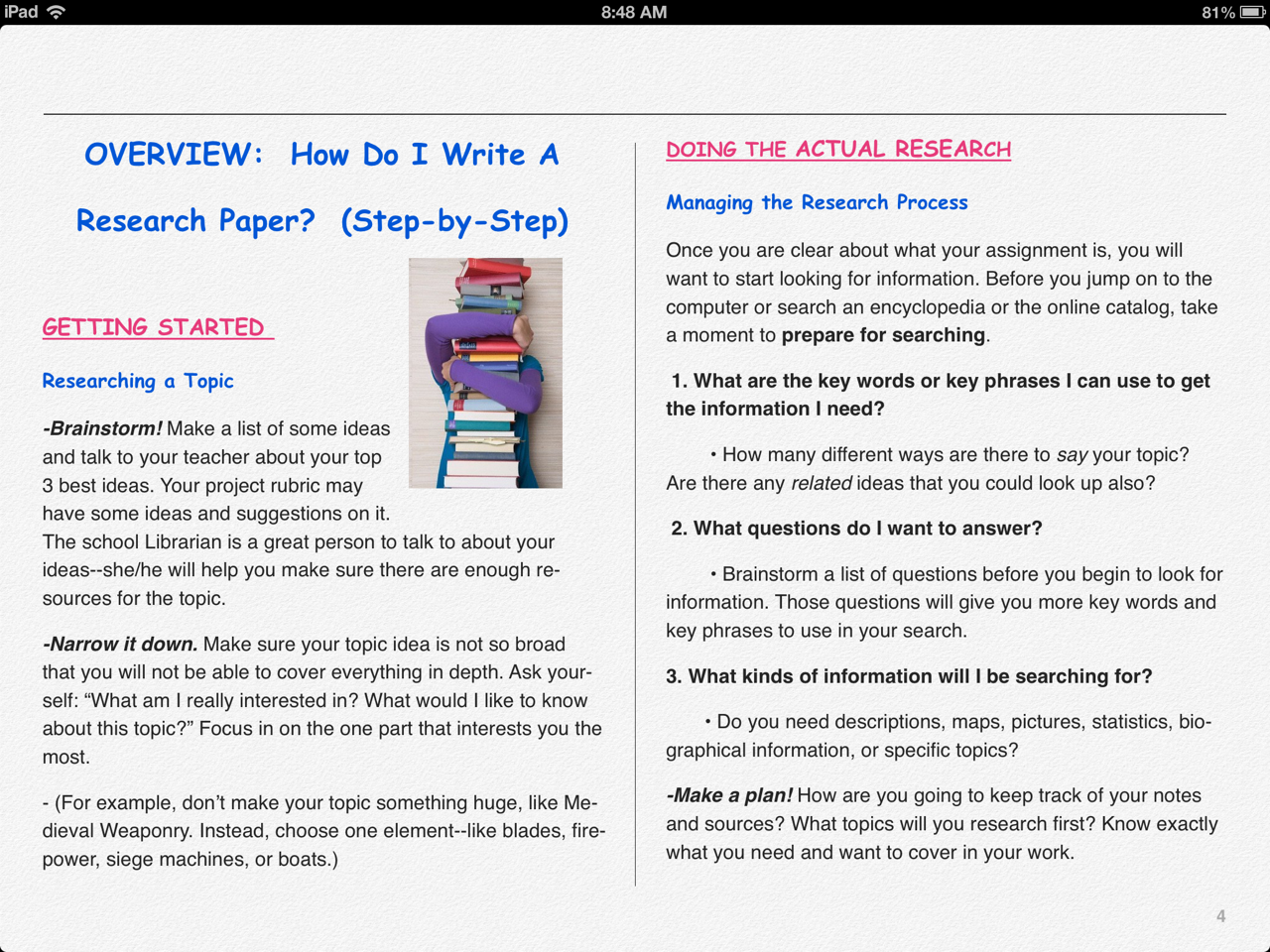
Research and Non-Fiction Writing Guide e-Book

The San Domenico Middle School Humanities Department discussed methods for standardizing the way students learn to do research, write, and cite sources in their research papers. Our department assigns the bulk of these types of projects so we took the lead in creating a guidebook both students and teachers could use as an easy reference for all of their research assignments.

We decided to make our guide available as an e-Book on the iPad -- easy to access and impossible to lose! 

I used iBooks Author as the app and created the guide on my laptop. Students download the e-Book from a link to the file stored in Box. On their iPad students simply select the file and click "open in iBooks" to properly display the book.

The Research and Non-Fiction Writing Guide includes chapters on works cited, in-text citations, making an outline, working with notes, formal writing conventions, and many other pertinent topics. 

The guide is based on MLA standards and navigation is easy on the student-friendly pages.

Our students find the research guide quite useful and are very enthusiastic about applying it in their work. It's so rewarding to give them something that is both relevant and helpful.

Our hope is that other teachers will find this e-Book equally useful for their own student papers, projects, and other assignments. Take a look at our guide by going here.


San Domenico Middle School

History Teacher, Humanities Lead Teacher, Study Skills Coordinator


Wednesday, September 25, 2013

IT - Not Your Father's "Instructional Technology"

Back in the 1982-1983 school year I spent a pretty good amount of time as an assistant to a research project through the Laboratory for Comparative Human Cognition in the Communication Department of the University of California, San Diego.

Apple II Computer
Back in those days "Instructional Technology" was a term used to describe computer-based learning. The research project was predominantly focused on trying to determine the educational value and efficacy of "drill and practice" software on Apple II computers.

Looking back at some of the research from that time it's surprising to me how similar the work was compared to what we do with technology in education today.

Today, the term "IT" means something quite different as the "instructional" part of the phrase has been replaced with "educational."

The reason for this change is directly connected to the phrase "Information Superhighway" which came a few years after my time at LCHC and referred to the Internet and the astronomic growth of electronic information. Today IT refers to the availability of this vast and growing amount of information. IT staff provide support for the access to, and the use of, this information.

Jason Clarke
In schools, businesses, and governments IT staff serve a crucial role in building, managing, troubleshooting, and yes even providing instruction on the use of a wide range of information technologies.

At San Domenico School a big part of the Technology Department is the IT staff that are such a vital part of the day to day operation as well as the educational program of the school.

We don't just provide our staff with computers, iPads, printers, media, and broadband wired and wireless network connectivity and then ask them to use it and fix it if it breaks or no longer meets their needs.

To use the classic metaphor, we need to keep the trains running. More importantly, we need to make sure people know how to run the trains, that they have the best possible trains available for the tracks they are driving on, and we need to assist them in determining if the tracks and trains they are using are the right ones to support the educational mission of our school.

Meet our IT staff. These are the people who help us keep the trains running.

Jason Clarke is our Technology Systems Manager. Jason is originally from New York but his family moved to California where he graduated from Tamalpais High School with letters in two sports. He studied Information Technology at the Lincoln Technical Institute and has held technology management positions at MySpace, FOX, and Rubicon. Jason is in his fourth year at San Domenico School where he manages the day to day operations of the IT systems and staff and helps with youth sports including serving as an assistant coach for the flag football program.

Robert Valdivia and Alec Barnhardt
Alec Barnhardt is Technology Support Specialist serving his second year at San Domenico School. Alec spent one summer as a camp counselor and four years as an assistant teacher and technology and IT support coordinator for the British International School in New York. In 2002 he was an 8th grade basketball coach in the Bolinas-Stinson School District. In 2003 Alec worked as an educational tutor for students with learning differences in the Bolinas-Stinson School District. Alec holds certifications as an Emergency Medical Technician and as an ambulance driver.

Robert Valdivia is Technology Support Specialist at San Domenico School. Robert joined the Technology Department in the spring of 2013. Robert is originally from Lima, Peru. His family immigrated to California when he was just two years old. After attending Gallinas (now Venetia Valley) Elementary, Davidson Middle, and Terra Linda High School, Robert moved to Hollywood and graduated from the Musician's Institute where he studied vocal performance. He also studied sound design at the Ex'pression College for Digital Arts. Robert has worked in corporate IT and spent two years working at the Corte Madera Apple Store where he earned several certifications in Apple hardware and software products.

San Domenico School is at the forefront of educational technology use in schools. Being one to one with iPads in grades 3 - 12 requires a strong team of IT professionals to help support the hundreds of users integrating these educational tools every day. Here's to Jason, Alec, and Robert! Thanks for keeping the trains on time, for making sure we have the best available tools, and for all you do to help us grow and use these powerful educational resources throughout the school.

Brad Lakritz
Director of Educational Technology


Wednesday, September 26, 2012

Mathematical problem solving with iPads

Krista McKeague, lead math teacher in our Middle School, writes:

This time last year...

I was just getting the hang of using a new iPad textbook for my Algebra 1 class, and still hanging on to my beloved tablet PC to write and project my math notes.  I liked my iPad and how it facilitated communication with students (Box, Socrative, Educreations, etc)... but I wasn’t sure exactly how to integrate it seamlessly in to my daily math instruction.  A couple things have changed in the few months.  I now have the infrastructure in my room to make optimum use of my iPad, and developers are finally coming out with iPad friendly math apps that actually promote mathematical problem solving, something long promised by rarely delivered.

I’ll start with my room.  Instead of manually connecting my iPad to the projector (and having the cord fall out every few minutes!), I now have Apple TV, which allows me to circulate in the room while writing notes and teaching (I’m still working on the skill of writing, walking at talking at the same time!). Apple TV also allows students to quickly project their iPad screen when asked to show their work or contribute to the notes.  With a few simple buttons conveniently located by my screen I can toggled back and forth between writing notes with my iPad, projecting a book or answer key with my document camera, and annotating a worksheet or example problem using my “smart pen.”  (A smart pens works with a smart projector to electronically write on the board, with the capability of saving for email or future use.)  I’m still working on perfecting this dance, but it’s coming along!

Next, I have been pleasantly surprised with a new level of math apps that are both deeper in the conceptual understanding they require from the user, and easier to use!  One of my favorites is a game called DragonBox (we actually use DragonBox+ which includes more levels) that has you solving complex algebraic equations without you even realizing you are doing math at first!  It truly marries a fun, addictive game quality to a very important and often complex concept (especially as you get into rational and radical equations) of balancing an equation as you isolate the variable.  According to the reviews, children in early primary grades enjoy it, and I certainly found it engaging! While most math apps up to this point have been an overlay of math drills on top of an entertaining backdrop, this is a new generation of math game that I believe holds true to it’s promise of promoting mathematical and logical thinking.  I am planning to use this with both pre-algebra and algebra students to strengthen their understanding of this important concept.

All in all, I’m enjoying that both the hardware and software in my world is becoming easier to implement and easier and more meaningful to integrate into my curriculum!

For an interesting review of DragonBox:

http://www.wired.com/geekdad/2012/06/dragonbox/all/

Sunday, September 16, 2012

New apps and new opportunities

One of the great advantages of utilizing the iPad as a digital tool to enhance student learning is that the iPad is an incredibly flexible tool for both teaching and learning.  Teachers can prescribe specific apps and steps to support the design of a lesson.  At the same time, students are empowered to use apps that help them organize their own learning and extend that learning beyond the initial learning situation.

What are the apps that help students organize their work?  When we launched the one-to-one program at the beginning of the 2011-12 year, we found answers that worked for us at that particular moment in time.  Almost a year later, we have learned about new tools and have new insights into how our students use the iPad.  While it is still early in the school year, here are some of the tools that our students are using this Fall:

7th Graders in Annemarie Wheaton's Life Science course
use iPads.. with lots of other tools and media!
Notability - At this time last year, we rolled out Noterize (now rebranded and upgraded as Paperport Notes) to support annotating documents, completing handouts, organizing PDFs at other documents, and -- for some students -- taking handwritten or typed notes.  This tool was particularly used by high school students for most note-taking and by middle school students working with PDFs.  Noteshelf was an app used by middle school students for taking handwritten notes.  Throughout the school year, we kept hearing from friends at other schools about the merits of a $0.49 ($0.99/individually) app called Notability.  Notability integrates handwriting, PDF annotation, typing, recording, and organizing in one app.  It works with Box which is extremely helpful in our environment (though Notability's connection to Box is not as perfect as it could be yet).  Notability is now the app our high school, middle school, and primary school teachers show students first.

Socrative - Last year we used an app called eClicker for student response on iPads.  Student response apps allow you to take the "pulse" of a class's learning quickly and in a way that empowers less confident students to tell you whether they've learned something without embarrassment.  Such apps can also be used for quick quizzes.  eClicker worked but was limited to timed questions and was a little pricey for school-wide use.  Now the original eClicker is no longer available (more information on the new version of eClicker is documented here) but we have had success using a newer entry to this field, Socrative.  Socrative is a little more complicated but has additional features for running "quizzes" and instant response for quick student feedback.  I particularly like how it does not require student and faculty iPads to be on the same network and how quiz-takers can access quizzes through the web on any device.

Clibe - Clibe is allowing our high school students to create beautiful (really -- they are stunning!) journals in science classes and in other subjects.  Notebooks are instantly shared with the teacher without hassle so that the teacher is able to review the progress of student work effortlessly and with no printing of paper.  We have had some challenges getting this sync process to work perfectly in every case and are trying to contact support with little success, but hopefully those challenges will be ironed out soon.  We do not use this app with younger students because there is no way to shut off the impressive -- but "open" -- Clibe library of notebooks others in the world have shared.

Pages - QuickOffice Pro HD was our word processor of choice last year.  Our students and teachers are turning more often to Apple's Pages app for word processing.  We will have more discussion of paper-writing in a future blog post.

In the coming weeks, this blog will narrate how these apps have been used in particular classroom experiences.  We will also highlight emerging trends and new uses for iPads in the curriculum.  For example, we are observing how software that had been flash-based on the web for younger grades is -- in some cases -- being supplanted by engaging iPad apps.  How is this changing how we learn and teach?  We will also discuss other challenges and successes as we work with these digital tools in Kindergarten through twelfth grade.

Thanks for being part of our integrated technology experience,

Christopher K. Sokolov
Director of Technology

Monday, July 9, 2012

iTeach 2012: Learning Through Reflection

David G. Behrs, Ph.D. serves as our Head of School.  He offers an opening reflection on our recently completed two-day professional development event, iTeach 2012.  The June experience brought 150 educators, school leaders, and technologists to San Domenico School for learning about integrated technology and iPads in education:

John Dewey once observed, “We do not learn from experience…we learn from reflecting on experience.” As I visited the more than forty workshops that were offered at iTeach, I was impressed by how far we have come as a community that values learning.  As a community, consistent professional development is a logical outgrowth of our Dominican values which value education and reflection.  Integrating technology into our classroom experience required growth over time both on school-wide and individual levels.  Our faculty members worked really hard to bring the engagement of iPads into our curriculums in a really exciting but demanding year.  I'm very grateful for their  efforts to educate, engage, and empower our students.

One really interesting moment from iTeach was the opportunity we had, near the end of the conference, to hear from a panel of our students about their experiences with the iPad.  One of our students summed up our experience with iPads in her own way: "the iPads didn't teach me.. they just helped me learn!"

Select the Youtube video to the right to view our student panel from iTeach 2012 and to watch the opening address of Dr. Behrs.

Wednesday, June 27, 2012

ISTE Day 3: Learning Together

San Domenico School's Assistant Head of School, Cecily Stock, shares highlights from Day 3 of ISTE as experienced by teachers from diverse grade levels of our School:

It has been an exciting learning opportunity for me to be able to accompany teachers from all three divisions of San Domenico to this conference.  We have spent our days attending a wide range of presentations, some focused on specific apps and techniques, and others addressing some of the broader conceptual and philosophical issues around technology and education.  In between, we have be meeting up in pairs or small groups to discuss what we are learning and brainstorming on how to best bring back this wealth of information to our colleagues at San Domenico.

Day 3 of the ISTE conference began with an inspiring keynote speech by Dr. Yong Zhao, Presidential Chair and Associate Dean for Global Education, University of Oregon College of Education.  SD high school math teacher and department chair Mike Sloan shares that, "Dr. Zhao challenged policymakers' interest in emulating 'high-performing' education systems (measured through international testing such as PISA or TIMMS,) arguing that the prescriptive nature of such systems fails to produce creative or entrepreneurial individuals.  To paraphrase his concluding remarks, 'The goal of education should not be to teach to increase test scores.   The goal of education should be to teach each child so that they may reach their maximum potential.'  Both entertaining and convincing, Dr. Zhao's presentation was a great start to another informative and compelling day at ISTE 2012, filled with so many resources and so much information, that one can only hope to collect and absorb as much as possible and to further explore in the days, weeks, and months ahead."  Mike also enjoyed a presentation later in the day on "Metacognition in Mathematics."

Primary school teacher, Nancy Goralski, also enjoyed the keynote speech and shares that, "Technology provides intellectual laboratories that will allow us to go further in education by providing a greater range and depth of projects from which to learn.  I'm looking forward to thinking of ways to stimulate the creativity of my students using technology as an essential tool to springboard greater possibilities."  Nancy also attended a presentation on  "Creativity Re-examined in Light of Piaget, Papert, and Bloom" in which she learned about four simple observations (knowledge, comprehension, application, synthesis) that teachers can make during the learning process that are easily understood and redefine creativity.  Within this context, technology is viewed as the most enabling and the least restrictive tool.

Middle school technology facilitator, Kali Baird learned about a new resource:  Apps4iSchool that will be launched this summer.  This app will filter and rate the thousands of educational apps that are currently available for teachers and students.  Math teacher, Valerie Davis learned how to do 3D drawings using Google Sketch-up, while I attended several presentations on digital citizenship, seeking out new resources and assessing what schools around the country are doing in this area.  The high point of the day for 6th grade moderator and math teacher, Brooke Gelber, was meeting the two educators who started the flipping "revolution", Jonathan Bergman and Aaron Sams.  Brooke and Mike Sloan have been flipping their instruction in both middle school and high school classrooms this year, and meeting these two pioneers was in Brooke's words, "So cool!"

Monday, June 25, 2012

San Domenico at ISTE Day 1

It may be summertime for our students but our faculty have been very busy this June!  We just concluded an amazingly positive iTeach 2012 conference here on our campus.  We are going to celebrate the learning and reflection that happened at iTeach on this blog soon -- but first, we bring coverage from our team attending the National Educational Computing Conference, ISTE 2012.

The first day of the ISTE Conference in San Diego was attended by faculty from all levels of the school, including: Brooke Gelber, Valerie Davis, Natasha McKeown, Cecily Stock, Kali Baird, Nancy Goralski, and Mike Sloan.  The conference kicked off with a welcome and orientation to the conference, which is huge with over 13, 000 attendees from across America and over 62 other countries.

The highlight was a panel moderated by the keynote speaker, Sir Ken Robinson, well known for his TED talks on creativity and author of the book Out of Our Minds: Learning to Be Creative. He began his presentation by questioning current public education policy that places teachers in the role of simply “delivering” pre-determined content rather than “inspiring” students’ creativity and passion for discovery.

The panel discussion then went on to highlight how important it is to inspire this passion because as panelist Marc Prensky, author of Brain Gain: Technology and the Quest for Digital Wisdom, said, “Passion is going to lead us to achievement.” They then turned to the role technology can play. Shawn Covell, who was representing communications giant Qualcomm, underscored how ubiquitous technology is in our lives. In fact, she quoted a stunning statistic that within the next ten years the number of mobile devices used will actually exceed the number of humans globally.  Thus, as Mayim Bialik, actress on the show Big Bang Theory and neuroscientist pointed out, educators now more than ever need to guide students to appropriately maximize the potential these devices provide – ideally inspiring collaboration, innovation and critical thinking.

The panelists’ messages definitely resonated with all of us from San Domenico and very clearly summed up the reasons why we have felt it was so important to boldly introduce one-to-one technology.  We are excited to find out through the hundreds of workshops offered this week how we can continue best meet our teaching and learning objectives.  There is still so much to learn!

-Natasha McKeown

Wednesday, May 23, 2012

Life with Apple TV in the Classroom

Middle School math teacher Valerie Davis pioneered the use of the Apple TV with her projector to make her classroom even more interactive:

When Apple upgraded their mobile devices, including the iPad, to iOS 5, one of the more intriguing features was a service called mirroring. The mirroring function allows the user to display the desktop and applications on an iPad when connected to an Apple TV.

As an educator, this allows the opportunity to no longer be confined to a certain spot in the classroom but rather the ability to circulate around the room. For the students, they are also able to connect to the Apple TV quickly and display their work for all the class to see. So what all does this mean for you? Here are a few of the pros and cons as I have seen in my use of the mirroring function.

  • I am no longer tethered by my dongle. Who ever thought I would use those words?! But the function allows me to move about the room with ease while still writing notes on my iPad. I can monitor the students participation and see their work. Of course this is great when you have students not doing what they are supposed to. I can stand behind them or next to them and make sure they are not being taught math by Fruit Ninja.

  • Any student can show me, as well as the class, what they have done on their iPad with a swish of the finger. Whether it is a project or their work on a math problem, it is quickly displayed on the screen. The students love to show off their work and can’t wait to be the next one called on.

  • Displaying iMovies or Powerpoint slides is quick and easy with very little wait time. I don’t have to worry about students taking their iPads out of their cases in order to attach them to my projector.

Now for a few of the cons:

  • Since it is so easy for the students to slide their finger and make their iPad display they of course try and do this when they shouldn’t be. I have finally allowed some time for the students to play around with the mirroring function so they could have their fun and get it out of their systems. Occasionally, I still have something show up on my screen when it shouldn’t but the novelty has worn off a bit.

  • It did take a bit of work to get the set up correct since my projector was not outfitted with an HDMI port. But thanks to a lot of hard work by others, success was finally achieved.

  • Buffering can sometimes be a pain. Because the information is being transmitted over wifi it occasionally gets slowed down and does not flow smoothly. If I am just writing notes on Noteshelf or iAnnotate, this is not a problem. But when showing iMovies it can cause problems with the images as well as the sound.

Overall, I love using the Apple TV mirroring function during class. The days of standing at the front of the class or sending students to the board have been replaced with technology. The 1-to-1 iPad program gets further enhanced by allowing the educator to use the iPad while still being able to focus on the students and their understanding of the subject material.