Showing posts with label Educational Technology. Show all posts

Tuesday, December 9, 2014

How EdTech is Like Recruiting for Football

The other day, I posted this Tweet:


In my mind, this 136 character blurb was clearly an epiphany! But maybe not - I got one Twitter “favorite” so perhaps I need to expand on what I mean, share the layers to this idea (and it still may just be a tweet, a regular tweet).

In a meeting with non-ed tech folks, I was trying to explain the nuances of the reality of integrating technology. And it hit me! Integrating technology was like asking every member of your school to join a sports team, like football. Now, if you think about your own reaction to playing football and then think of some of your co-workers and what their reactions may be, it becomes clear. Some teachers would be, “Whoo-hoo! I LOVE football and know all the rules and, WOW! This is just awesome!” While other teachers will have recoiled at the thought, while thinking, “I hate football and don’t even understand the game!” Or, “What!?! What do they want me to do now? I am too old for this!”

Well folks, this is just like integrating technology. Like joining a football team, using or having technology enter your classroom has a distinct and individualized emotional response. Ignoring this response or diminishing its power is a sure way to fail. Recognizing and hearing what is often unspoken (but still communicated) is perhaps one of the most important elements to creating an environment in which teachers feel safe enough to take risks!

How can you do this? One way involves directly identifying and discussing this emotional aspect in a faculty meeting, gathering or conference. I talk about the very differing responses and then clearly point out that this is completely normal - the nodding heads and reluctant chuckles work towards establishing camaraderie...exactly as we do for our students!

Additionally, tech professional development for teachers needs to be both broad AND deep. Broad to have enough choices that each teacher can relate to something or see it happening in their classes. Deep enough to meet the individual learning style of each teacher -- sounds impossible, BUT, offering individualized support goes a long way. Not all may use the individualized offer of professional development, but all benefit from knowing that that type of support exists.

To return to the football analogy, please take a moment to consider ALL of the parts of a successful football team: Coach (Director of Tech), assistant coaches (Technology Coordinators), and players (some teachers). However, where do the non-football playing teachers fit in? How can they be part of the team? It is not just those who can jump in and be players on the field. Who keeps the field in top shape? Draws the yard lines (is this even a thing?)? Organizes the schedule? Basically where I am going with this is that when teachers are asked to join a football team, they often think that they need to be an actual player of football to be successful. Once they realize that there are many differing roles, ie: differing approaches to integrating technology, their emotional response can dial down from the “fight or flight” response and into a place of openness, curiosity and creativity.

Kali BairdPreK-8 Technology and Science Lead

Monday, November 3, 2014

Upgrading to iOS 8 - A How To Lesson

After thoroughly testing Apple's new iOS, the technology department is ready to go ahead with a school wide upgrade process. We want all San Domenico iPad users to implement this update by Wednesday, November 11, 2014.

Please note: We would like users to implement this upgrade on their home network to prevent overloading our school network and so that you will have your device ready to go at school the next day. Also, there is one very significant issue related to your Notability App that we will address at the end of these instructions.

Please follow these instructions:

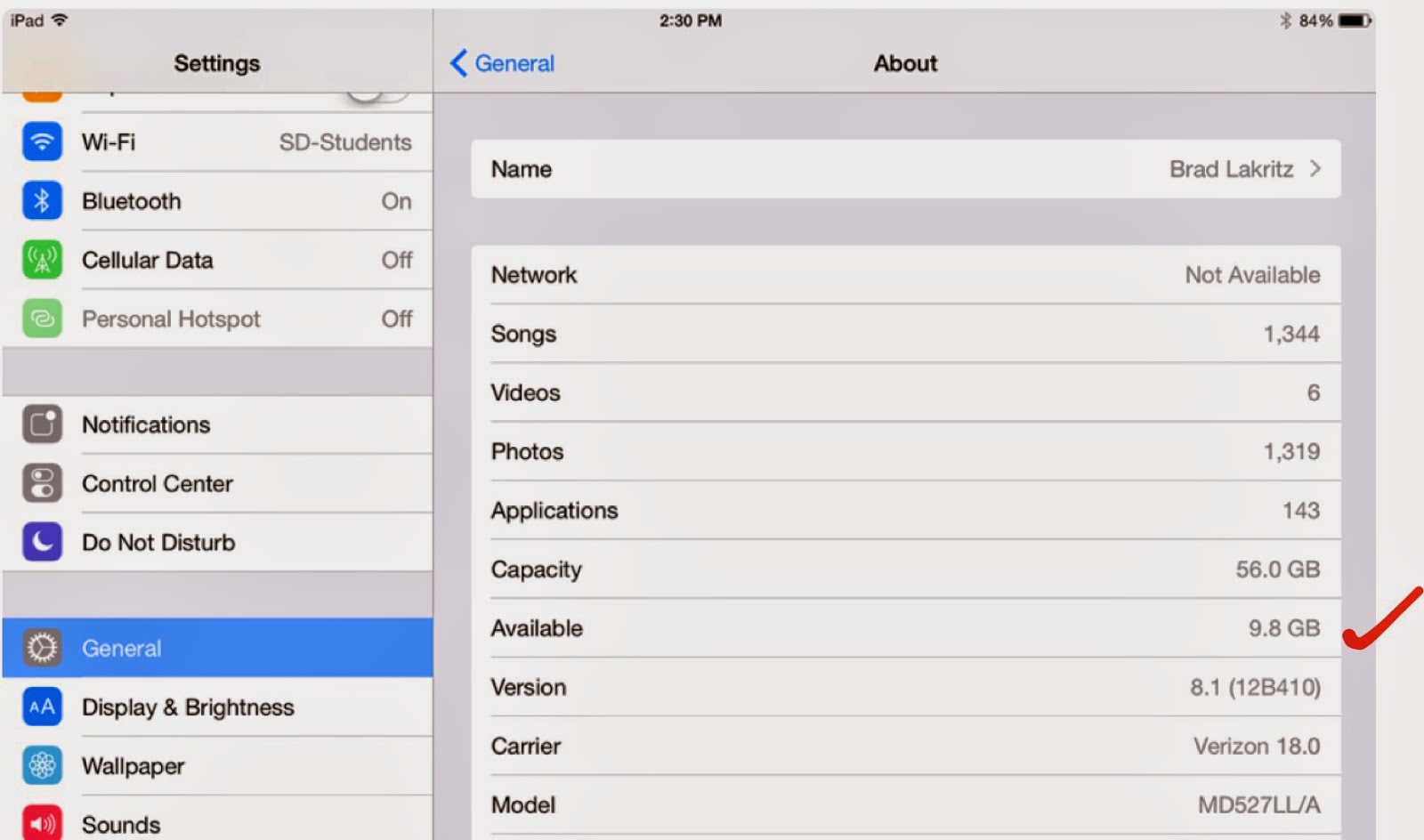
1.  This upgrade requires a large amount of space on your device. Make sure you have at least 5 GB of available storage on your iPad (preferably more). Here is a Business Insider article that explains why you need all this storage space on your iPad in order to perform this update. In the article you will also find a brief explanation of How to Free Up Space on your device in preparation for this process.

To check your available space open your Settings App. Tap General > About. Halfway down the screen is the Available storage. The amount available is listed on the right. If you do not have 5 GB of available storage you will need to clear space.
2.  Make sure your iPad documents and data are backed up. Check the digital tools presentation for instructions on how to set up iCloud, Google Drive, and Box back ups for your data.

3.  Make sure your iPad is fully charged and plugged in before you begin the update. For good measure we recommend you close all open Apps.

4.  To begin the upgrade open your Settings App. Tap General > Software Update > Download and Install

Note: This is a very large file download. Be patient in this process as it may take a long time before you see progress on your screen. Also, your iPad may have already downloaded the installer in which case you will see a button that only says Install. The entire process may take 45 minutes to an hour or more depending on your home network. 

If you do not have enough space to perform the upgrade the Download and Install button will be grayed out and you will not be able to activate the process until you clear enough space on your iPad.

5.  Once the iOS update is complete your iPad will restart. One of the first windows you will see provides you with an opportunity to Upgrade to iCloud Drive. Because of a compatibility problem with the Notability App at this time you should NOT choose this option. 

Tap Not Now instead. Your iPad will ask you a second time "Are you sure you don't want to upgrade to iCloud Drive." Tap Continue.


6.  Once you are successful upgrading your iPad to iOS 8 please open your Notability App and check your documents. Open a few of them to make sure your files are correct. After successfully opening your Notability files you may enable iCloud Drive. This new feature allows for sharing your documents across different devices.

7.  To enable iCloud Drive open your Settings App. Tap iCloud. You may turn on iCloud Drive there and configure some of your Apps to iCloud Drive including Contacts, Calendars, Reminders, Safari, Notes, and Find My iPad.

To enable iCloud Drive in Notability open the App and tap the Settings gear in the lower left corner of the main window. Tap iCloud and slide over the switch to turn on iCloud Drive. Once again please be patient. Depending on how many documents you are connecting through iCloud Drive, the process may take some time to sync.

You also have the option of turning on Google Drive and Box back ups for Notability. You may use this feature to back up a variety of file types including .PDF and .RTF formats. We recommend you choose the Note option which allows you to open the file on different devices in the native Notability format.

Please note that the San Domenico technology department is happy to assist you with this process. Contact us through the tech support ticket system or stop by the office. We're happy to answer questions.


Brad Lakritz
Director of Technology

Wednesday, October 29, 2014

iOS 8 Comes to San Domenico

Each year Apple introduces new technologies designed to improve software and hardware functionality, better integrate computer systems, and expand our ability to communicate in the digital world.

Often new computer operating systems (or iOS for mobile devices) create problems for users with older hardware devices. In addition we sometimes experience incompatibilities with Apps which are yet to be updated and optimized for these operating systems.

The San Domenico technology department works very hard to assist in the transition to new operating systems. We help users avoid the system conflicts and loss of data that might occur in the process of updating their devices.

This is why we delayed the introduction of iOS 8 on the iPad. We appreciate the patience of our hundreds of staff, students, and families as they wait for our planned migration to the new iOS this year.

There are four major benefits of waiting to upgrade in these situations:

1. Software developers have time to catch up and update their Apps to be compatible with the new operating system.

2. Apple has time to improve and release their own OS and iOS updates in response to problems they identify.

3. This extra time also provides the San Domenico technology team time to analyze how the new OS impacts the important Apps we rely on in our daily work.

4. Our team can develop strategies and provide instructions on the update process for our users.

Next week we will give the go ahead for students and staff to update their San Domenico iPads. We'll provide some instructions specifically related to the new iCloud Drive and how it can impact different Apps we use.

Contact us via the tech support system if you have any questions before you update your iPad or if you experience problems afterward.

Of course, as always, please remember to perform your backups before moving ahead.

Brad Lakritz
Director of Technology

Friday, October 17, 2014

Fourth Grade Has Respect

San Domenico fourth graders have been talking about respect this year and were inspired to write a song about it!
Mr. Hopper has "Respect." 

As part of our Second Step program, Mrs. Yazzolino and students discussed the importance of having respect for the earth, nature, our bodies, each other and most importantly, ourselves.

Students then wrote their own lyrics and we put them together for a "Respect Rap". With the help of Mr. Hopper's production skills we recorded a song called "A Great Word", which turned out to be a huge success.

Check it out and feel free to sing along:

    https://soundcloud.com/rcwinkly/a-great-word

Ryan Hopper
4th Grade Teacher
Lower School Technology Facilitator

Thursday, October 9, 2014

Learning Management Through Technology at San Domenico

Learning Management Systems are a big topic in education these days. How we define learning management helps schools determine the system(s) they use. Being 1:1 with iPads at San Domenico School, we've learned that the devices themselves are a learning management system.

Students create, organize, and manage their email, photos, audio and video recordings, as well as all the files they make using typical document creation Apps. The iPad helps them keep track of everything they do.


Annotating the Gettysburg Address
Taking it another step further by using Apps like Notability, students manage the notes they take in class or when they are working on assignments. Many teachers provide students with electronic documents and ask their students to work on them using Notability.

Students may choose to annotate the document with highlighters and typed or hand written notes. They may add images and record voice notes to the file. Then, if required, the edited file can be returned to the teacher via a number of different electronic pathways.

Notability "notes management"
Students use other features in Notability to organize and sort their documents. Within the App they can assign notes to color coded subjects to differentiate categories or classes.

Turning in assignments and keeping their files backed up are two additional but important aspects of learning in a 1:1 iPad program. These are another level of learning management and there are a number of different cloud based systems we use for these purposes. I will cover them in subsequent iLearning Blog entries.

At San Domenico School we believe that what students do with their education is as important as their academic performance. We also believe that technology supports that performance by helping students learn and manage their academic course work. That's why 1:1 computing is such a crucial and successful aspect of our educational program.

Brad Lakritz
Director of Technology

Tuesday, September 16, 2014

Common Sense Media Signature School

We take very seriously the idea of being a Common Sense Media Supporter School. When San Domenico went 1:1 with iPads everyone agreed it would be important to embrace the technology and all that comes with it including games, distractions, and potential dangers. We knew that teaching our Dominican values would help our students recognize the complexity of this technologically advanced learning environment and to respond with integrity to any challenge they face.

But it doesn't come easy. Digital citizenship lessons built by our own teachers over the past four years are the backbone of this program. We are very proud of our middle school teacher Wynn Richards who is a certified Common Sense Educator. Wynn is the architect for many of our digital citizenship lessons.

But this hasn't happened in a vacuum. Many of our lessons were created from resources provided by Common Sense Media. In fact, this year we began using the Common Sense Media Digital Literacy and Citizenship Student Workbooks with our middle school students. Being 1:1 with iPads makes it very easy to have these resources right there in front of our students. These and many other resources are available free on their website as electronic books or .pdf documents for educators, students, and parents.

And we don't stop there. Each year we provide opportunities for parents to learn along with us about how we use iPads in learning and how we provide the best possible tools for students to thrive in these conditions. It's not enough to just say "the best filter is the one between your ears."

This year we launched into the Common Sense Media Bay Area Supporter School program which brings even more resources to the school community as a whole and helped reinvigorate our curriculum and teacher preparation. One of the tools they provide is the widget located here in this blog entry. The widget provides dynamic links to current stories relevant to parents from the Making Sense blog:


Here is a snippet from a recent blog entry:

     "YouTube personalities become popular because they speak directly to their fans, with no network oversight, no whitewashing of their language, and no fancy production. They say what they want. They're real. But given that these folks are making big bucks off their YouTube channels - and making a huge impression on kids -- it's important that parents get clued in to who they are."
____________________


We look forward to partnering with our families to educate all our students to become good digital citizens. We appreciate having Common Sense Media tools at our disposal for this important aspect of our work. We hope you will take advantage of them as well.

Brad Lakritz - Director of Technology

Students Teaching Students!

Question: What happens when we see that the updated iCal app is no longer a great tool to record homework?

Answer: Informally survey the students to discover their preferred apps. The top two contenders were myHomework and The Homework app.

Solution: This problem provided a great opportunity for 12 students from grades 6, 7, and 8 to step into a leadership role to teach other students. The group of twelve was randomly paired up to visit each 6th grade Advisory to share the two apps. In watching the “junior teachers” in action, they were awesome! Each pair shared their app of preference by projecting the app and then showing the various functions. They also talked about what they liked about it and then answered questions.

Students teaching students at San Domenico
Our 6th grader rocked it! “Since it is my first year in middle school, going up and speaking in front of a class helped me build confidence not just for speaking, but it also helped give me confidence that I can have for the rest of my 6th grade year. This experience will help me feel more comfortable speaking to a large audience in the future.”

Our 7th grader had a great time! “It was a fun way to be in the teachers shoes for a little bit and sharing something with younger kids.”

Our 8th grader had a blast! “It was really fun teaching the sixth graders about the homework apps, they all listened and asked really good questions. The messed around with us too and made some really funny jokes.”

And from the teachers: "They were all so helpful and informative that my advisees immediately downloaded one of the apps to try out.  Well done!”

And one more, “I love it when students get to be in a role of leadership to show off their skills.”

Students teaching students is quite an empowering moment of leadership!

Kali Baird - Director of High School Advising
PreK-8 Science and Technology Lead

Wednesday, June 18, 2014

iTeach 2014 - June 15-17, 2014

San Domenico's Dominican values of Study and Reflection are integral to our annual technology conference iTeach.

Ryan Hopper and Melissa Yazzolino - iTeach 2014
Each year we offer as many as 75 workshops, panel discussions, and keynote addresses. These sessions are specifically designed to provide professional development for teachers integrating iPads and other technology in their schools. Over 80% of iTeach sessions are taught by San Domenico teachers.

Lower School Technology Facilitator Ryan Hopper presented several sessions during the three day conference. "Thanks for putting on the event" he said, "I'm exhausted but grew as a presenter, speaker, facilitator and general tech enthusiast!"

Kali Baird - Teaching iPad Basics
Our iTeach 2014 Sunday iPad basics workshop was the largest ever with 40 participants. PreK-8th Technology and Science Lead Kali Baird took her participants through a series of exercises designed to help them feel comfortable using iPads. The more comfortable they are with technology the more likely teachers will use technology with their students.

Jason Clarke - Teaching iPad Basics
Another highlight of the conference this year was the student panel. Students from all school levels at San Domenico shared their experiences learning with technology. Students described how they made art, managed their files and homework with cloud resources, how they used the iPad for note taking, and generally described ways the iPad helps them throughout the learning process.

Our teacher panel centered on the SAMR Model. Led by Baird in conversation SD teachers explored how they use technology to redefine their educational processes and goals. Developed by Ruben R. Puentedura, the SAMR model looks at how different uses of technology in learning can substitute for traditional teaching tools and methods; augment the lessons with improvements; modify tasks students are expected to do; and eventually to redefine the tasks and learning processes.

San Domenico School Director of Religious Studies Mirza Kahn produced a short video to provide you with some additional insight to the power of iTeach. Please let us know if you are interested in attending iTeach 2015. We'd love to see you there!

Brad Lakritz
Director of Technology


Friday, April 11, 2014

Augmented Reality Arrives in SD Primary School

Recently I attended the Computer Using Educators (CUE) conference in Palm Springs with three of my SD colleagues. Among the new educational technologies I learned about at CUE, I was most impressed with apps that integrated augmented reality.

Augmented reality associates objects or images with a video or other media using image and object recognition technology. Objects come to life when a digital device (such as an iPad) recognizes them through one of these Apps. Some of the apps I saw included Aurasma, Elements 4D, Anatomy 4D, and colAR Mix. 

I decided to use this technology in my teaching because I thought it would be a very effective way to engage both the young learners in my class and other teachersFor my first experiment I used Aurasma. 

The goal of this project was to review turning fractions into decimals. 

I provided each student with a different fraction. Students created videos explaining how they solved the problem. They uploaded their videos to the Aurasma cloud system.
Students then made an “aura” of their equation. The aura can be either an image or a three dimensional object. In this case I had my students make a small drawing of their equation.

Students used the Aurasma App to associate their video to their aura. Their aura became the trigger that launched their video in which they explain their thought process of solving their equation. 


Each “aura” and video is unique to the students’ iPad so that they are only watched with the student's permission.  Students were able to show off their work to adults visiting on Grandparents and Special Friends DayThe fourth-graders were beaming when showing their videos and it was amazing to see them take such pride in their math work!  

I definitely plan to use this app again for a geometry scavenger hunt. I can't wait to see how my next experiment goes. It's also great to hear that many other teachers plan to start using Aurasma as well so that we are able to collaborate and come up with new ways to incorporate this technology.


Ryan Hopper
Math Teacher
Primary School Technology Facilitator 


Sunday, March 23, 2014

Training the Trainers - CUE 2014


The success of the San Domenico School 1:1 iPad program depends on a variety of components. Professional development and curriculum design provide important support for our teachers in the task of integrating technology in learning at San Domenico.

Our technology leadership plays an important role in this process. The leadership team includes a technology facilitator in each school level.

Ryan Hopper (primary school), Kali Baird (middle school), and Dr. Doris Brown (high school) are our technology facilitators. These teachers consult with their colleagues helping them build technology rich lesson plans.

You might wonder who trains the trainers?

This week we sent them to their own professional development program at the Computer Using Educators (CUE) conference in Palm Springs.

CUE 2014 provided a wealth of opportunities for any teacher looking to build a repertoire of classroom activities and lesson plans for integrating technology in the classroom. CUE had everything from Augmented Reality to Google tool SLAMs. Some sessions showcased software tools while others provided interactive discussions of best practices for technology integration.

One of my favorite sessions at CUE 2014 was presented by Scott Kley Contini. Contini is Assistant Director of Instructional Technology - Pedagogy and Integration Coach, The Harker School. In his session Ready, Set, Screencast! Contini presented Harker School teacher screencasts that describe their summer professional development activities.

The screencasts are part of the requirement for teachers who get stipends for summer professional development. They are presented at faculty meetings at the beginning of the year. Faculty may also view them later from a YouTube playlist. The screencasts help them learn new ideas and get excited about integrating new learning technologies.

Having teachers present their work for their colleagues is an effective professional development activity for everyone involved.

Of course San Domenico teachers wouldn't be able to attend a conference without presenting at a session or two.

Here is a Dr. Doris Brown doing a "CUETip" presentation on how she uses the student response app Socrative.

This June San Domenico School hosts iTeach 2014. Join our teachers and special invited guests for a fun filled schedule of interactive workshops, panels, and keynote presentations. There will be something for everyone. We look forward to learning with you this summer.

Brad Lakritz
Director of Technology
San Domenico School


Saturday, March 22, 2014

CUE the Learning - San Domenico Technology Leaders Learn With 5,250 Of Their Peers

It's been at least 15 years since my last Computer Using Educators (CUE) conference. This week I came back to a bigger and better professional development program for educators. San Domenico technology facilitators Ryan Hopper, Kali Baird, and Dr. Doris Brown joined me for three days of learning fun.

CUE is big! There were over 5,000 educators with us this week.

Many of us had to wait over an hour in line to check in at the beginning of the conference which meant we missed most if not all of the first session. There were many sessions where there were just too many people to fit in the space provided for the presentation.
Dan Meyer perplexes thousands of computer using educators

It is exciting when you realize there are this many educators supported by so many schools and school districts wanting to train their teachers to integrate technology in their classrooms.

It's bit daunting when you find that even the hall for the keynote presentation didn't have enough space for all the people to sit. They actually had live feeds into other rooms during Dan Meyer's opening keynote on Thursday evening.

There is something very special about having an opportunity to join together with your colleagues to learn, collaborate, and develop technology skills. I met so many educators doing amazing things in their classrooms.

Just to share one touch point from the week I'll leave you with a brief description of one lesson I learned from Kay Little and Sandy Patterson's workshop on iPad Projects for the 21st Century Classroom.

Kay and Sandy teach in a public school in southern California. When their school went 1:1 with iPads in the second grade two years ago Kay and Sandy began developing classroom projects together.

Today, Kay is a Teacher on Special Assignment who helps Sandy and other teachers learn how to integrate the technology in their classrooms.

This is significant because it shows the importance of the holistic approach to technology integration.

First the district and school decided that integrating iPads was an important step to take. Then they gave the teachers and students the tools while pairing these two teachers in the process of trying it out and seeing what works. Finally, after some failure and success, they decided that leadership and training were important to spreading the work throughout the school.

I look forward to hearing more about their work as these two computer using educators expand into bigger and better things. I also look forward to sharing more about what we experienced at CUE 2014.

It was very good to be back!

Brad Lakritz
Director of Technology
San Domenico School

Wednesday, March 19, 2014

Animation Creation Helps Students Review Abstract Concepts in Science

Genetics is a unit of biology with many levels.  

There is the exploration of our traits when students compare some simple dominant and recessive traits and consider which genes they received from parents and ancestors. This leads to the logical problem solving of Punnet Squares.  

There is the history and biochemistry of DNA and all the new applications of technology, from DNA fingerprinting, cloning, and the creation of Genetically modified organisms. 

Ethical questions also arise from this new knowledge and ability. 

During this unit students do everything from lab work to debating the issues. When it is time to review for the unit test I find the biggest challenge for students is being able to explain what is happening during the biochemical processes that we cannot see with our eyes.

To address this limitation I incorporate an animation assignment into the review process.

Here is an overview of the assignment:

Students work in table groups already. For this assignment each table group is given a different topic: Protein synthesis, DNA structure and replication, creation of Recombinant DNA, or DNA fingerprinting

Students must have a clear understanding of their topic in order to plan, script and create their movie.

Students use dry erase boards, Bendaroos, clay, beads, and colored paper as props for a movie created in one 85 minute class period.


Using an animation App such as iMotion HD (Free) or iStopMotion ($9.99) each table had a stand to hold the iPad in place while they worked. Each group completed their animation shots and selected an appropriate play speed then saved the movie to their camera roll.  

Most groups made their entire animation in one series. Some realized they could build from a series of animations and even action shots that they would splice together later.  

From here the students could further edit their animation in iMovie, add subtitles, and include a voice over.  

The assignment is rushed but the point of the lesson was to review concepts and not create the "best animation." I could give more instruction in the App and time to storyboard if I was looking for a more polished finished product. I believe the film making process lead to the review of the material they needed.

My students easily figured out the apps and helped each other between groups if one person had more knowledge. As a teacher I am able to circulate and answer questions -- more about the biology than the technology. At the end of class, I show the short clips to the whole class and share all the movies with the Biology classes on our Moodle page for them to use for Review.

Below is an example of student created work for this assignment.


Hilary Staples
High School Science Chair
San Domenico School


Wednesday, January 29, 2014

iTeach, Therefore I Am

Several years ago I attended the California Association of Independent Schools (CAIS) Northern California Regional meeting. I attended a session on teaching animation in primary and middle schools with Barbara Cohen who, at the time, was Director of Technology with the Marin Country Day School.

Barbara Cohen
Barbara began her workshop with introductions and went out of her way to explain to all the other people in the room that she'd known me for a very long time. She added that I had taught her everything she knew about teaching video production with students.

I was a bit embarrassed about this introduction to the group. After all, the work I did with Barbara was at least 10 or 12 years earlier. We worked together on a project I created that taught students video production with VHS camcorders and linear video editing equipment. That process became obsolete long ago.

It occurs to me now that Barbara was really saying I had taught her an important lesson about the power of teaching with multimedia in the classroom. More specifically, I had taught her the value of engaging students in media production in the classroom.

Student video producers circa 1994
Classroom media production projects create an environment that promotes a deepening of student understanding of the content in their classes. Student media projects are also an integral part of student assessment in the modern classroom -- especially in 1:1 schools.

However, today students make their own videos on tablets and cell phones, and publish it for the world to see -- without the help (or even the request) of their teachers!

Which brings me to iTeach 2014.

At San Domenico School technology is a vital tool in the entire educational process. Teachers use it for their own personal productivity and for managing their educational resources and student grades and information. More importantly, because we are a 1:1 iPad school, we are engaing our students with technology every day. Having a powerful research and communication device stuffed in your backpack provides amazing access to information. These devices also include a variety of tools we now call Apps. Students use them to collect, analyze, and produce their own projects based on their research.

This is all fine, as long as everyone knows how to use these tools.

In a recent survey of San Domenico teachers, 82% said they publish course materials online using a variety of "cloud" resources including Moodle, Blogs, Google Sites and Drive, Box, Turnitin, and our Library web page. 93% of our teachers say they engage their students with digital tools in their curriculum 25% of the time or more in class. Almost 40% of our students are required to complete some sort of digital portfolio as part of our curriculum.

92% of our teachers say their comfort level with using technology in their classroom is 5 or higher on a scale of 1-10. 68% said they were a 7 or higher. On the same scale, 77% of our teachers answered 7 or higher when asked how important it is to continue to expand the way they integrate technology in their curriculum.

When teachers were asked to name the most important areas for us to focus when thinking about ways to improve technology integration in our curriculum they answered:

   "More professional development"
   "Technology specific curriculum development"
   "Time to collaborate with my colleagues"

Whether it be regular faculty meetings, one of our school level technology committees, outside conferences and workshops, or the creation and delivery of  iTeach 2014, our teachers want to learn from and teach their colleagues what they know about teaching with technology.

Sharing what you know, and being willing to learn from others is certainly a hallmark of teaching and the teacher very often becomes the student when it comes to technology. Now, with  iTeach 2014, San Domenico teachers and other leading technology using educators come together to teach and to learn about using technology to enhance student learning.

Thank you Barbara for reminding me that engaging students with technology on a regular basis is a powerful way to deepen their learning. I look forward to learning with you at iTeach 2014 this summer.

Brad Lakritz
Director of Technology